What GitScribe does
Modern Large Language Models can answer sophisticated architectural questions, debug complex race conditions, and refactor entire subsystems — but only if you give them the right code context. Manually copying files into a chat window is tedious, runs into context overflows, and frequently wastes precious token budget on lockfiles, test fixtures, minified builds, or irrelevant assets.
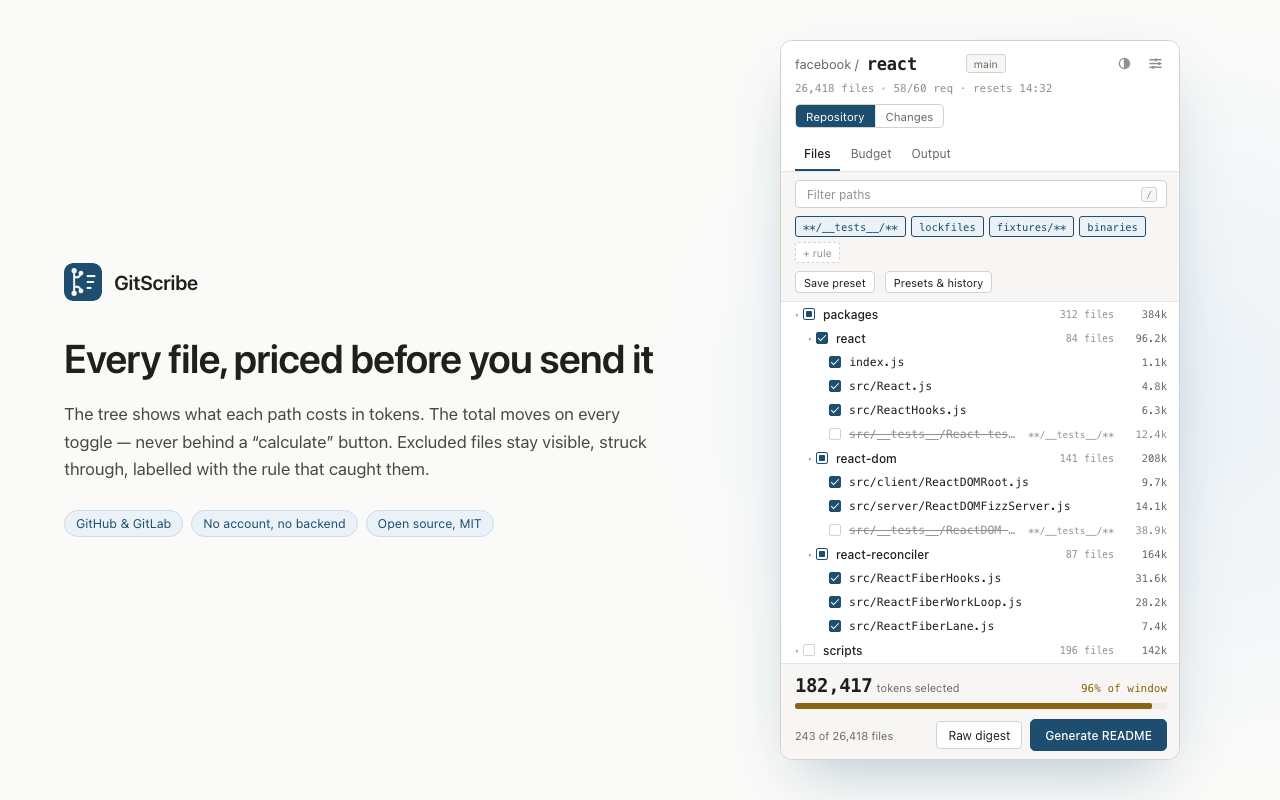
GitScribe bridges your source code hosting and your AI workflow. Open any GitHub or GitLab repository, pull request, or commit range (`v1.0...main`), select the files you care about in an interactive tree that prices every single path in tokens in real time, and copy a clean, structured digest formatted for Markdown, XML, JSON, or plain text prompts. There is no “calculate” button — the total recalculates instantly on every click.
Two Modes, Two Different Privacy Stories
Developer privacy is paramount when working with proprietary repositories. GitScribe is architected around two clear operational modes:
- Raw Digest (Zero Cloud, Zero Cost) — No API key required, no token costs, and your source code never leaves your browser. GitScribe fetches file contents directly from GitHub/GitLab via standard client-side API requests, formats the bundle locally, and copies it to your clipboard.
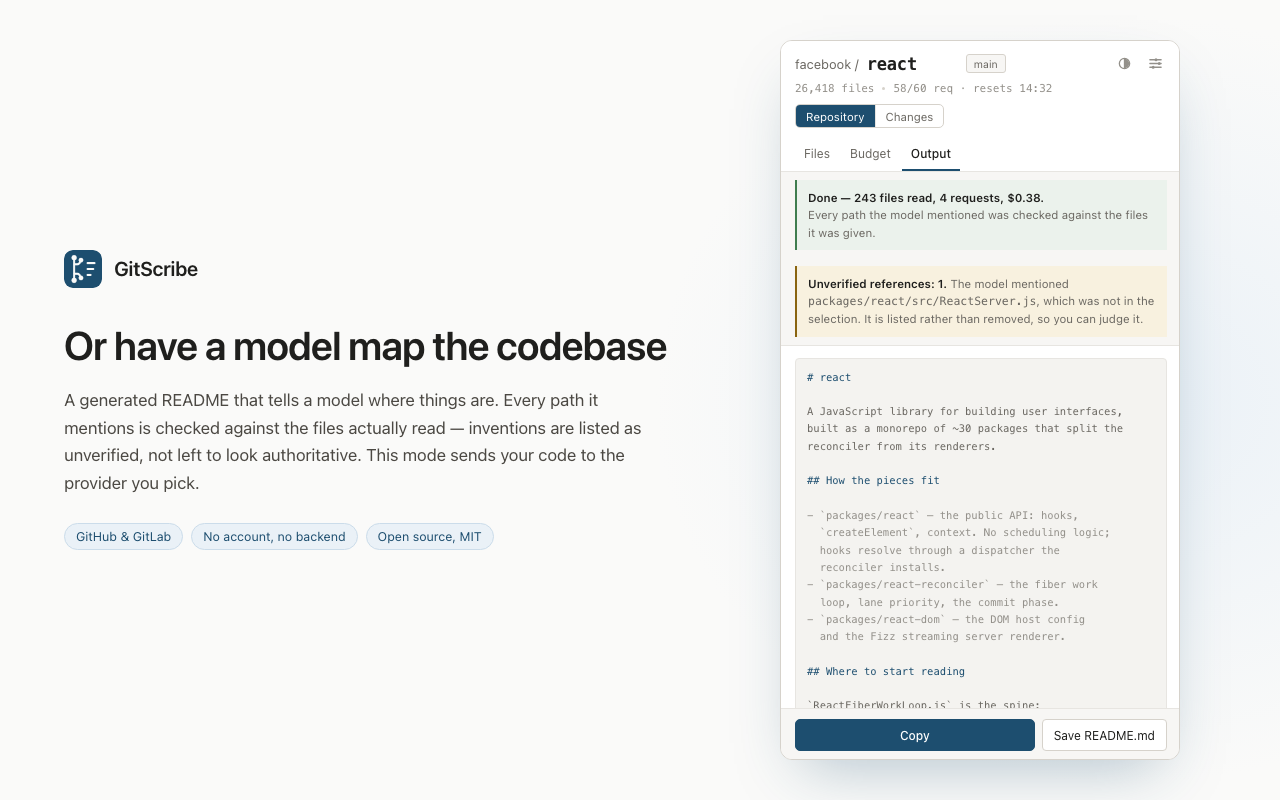
- Generated README & Codebase Map — Uses an LLM to read the selected files and write an authoritative, structured README explaining module architecture, dependencies, and execution flows. Upfront costs are calculated before you commit, and traffic flows strictly between your browser and the model provider you specify. Ollama is the local exception: run open-weight models on
127.0.0.1for 100% free, private local generation.
Key Features
1. Live Token-Priced Tree Navigation
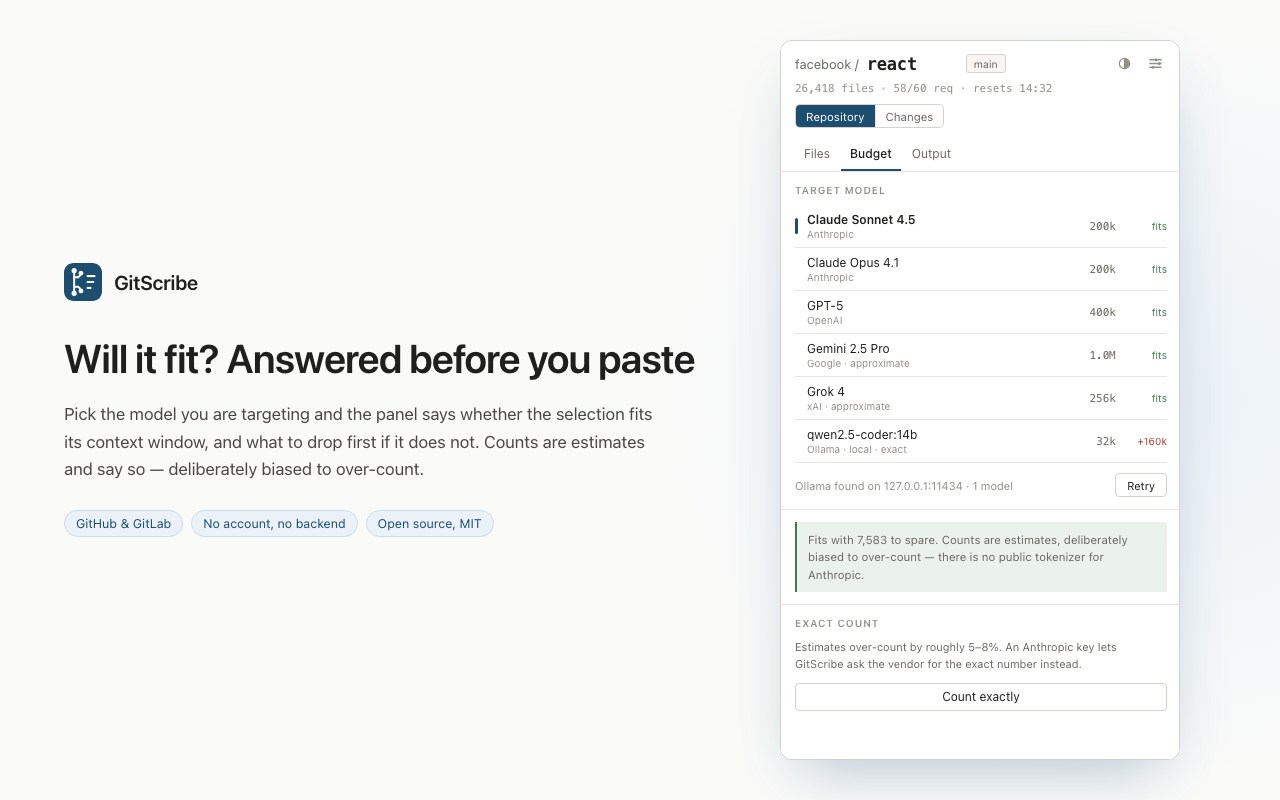
Every file and folder shows its exact token cost directly in the repository hierarchy. When you select or deselect a file, the total token counter updates on the fly. Select your target model (Anthropic Claude 3.5 Sonnet, Google Gemini 1.5 Pro, OpenAI GPT-4o, or local Ollama), and GitScribe visually confirms whether the selected files fit comfortably inside the context window — highlighting the heaviest files to drop first if you are over budget.
2. PR & Commit Range Diffs
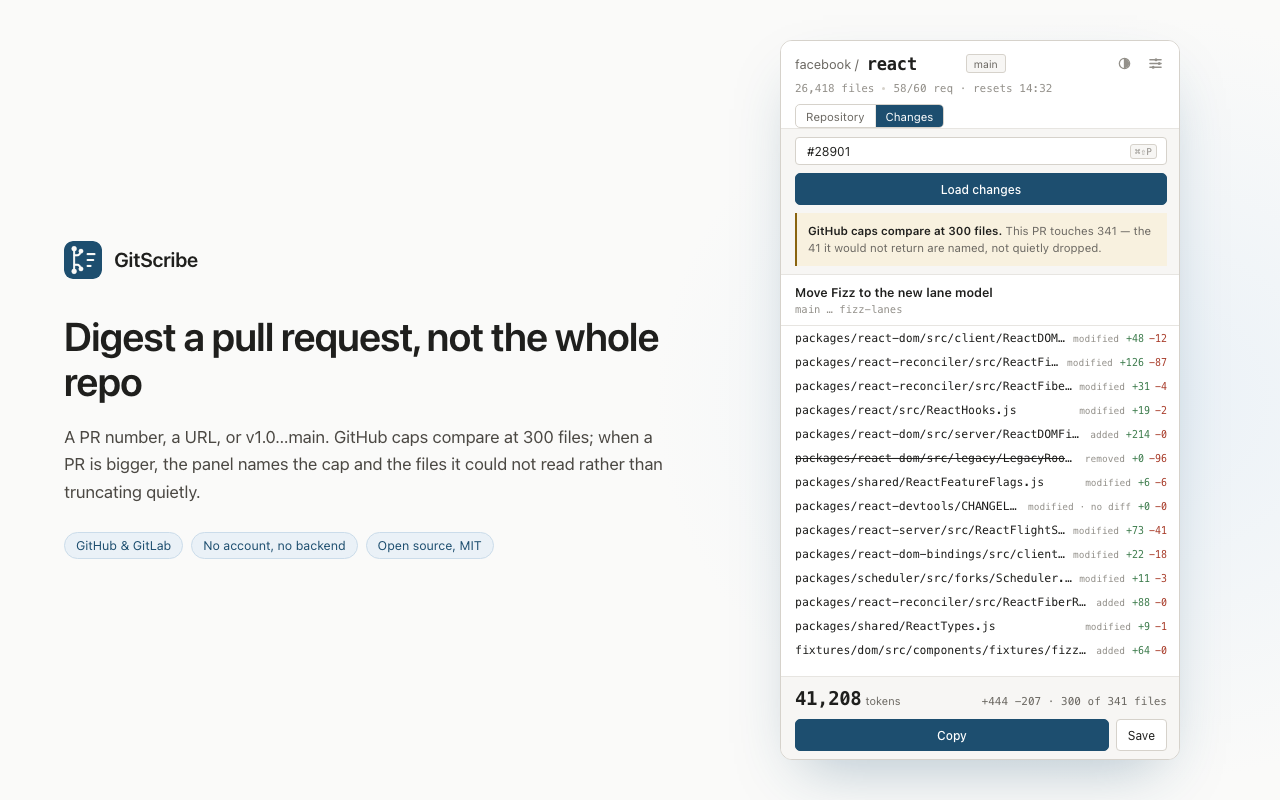
Instead of digesting an entire repository, switch to Pull Request mode or specify a custom comparison range (such as v2.1...feature-branch). GitScribe extracts modified files and patch diffs, letting you ask an AI model to review code changes, catch subtle regressions, or draft release notes without extraneous context.
3. Visible, Struck-Through Exclusion Rules
Most tools silently omit files when applying .gitignore or default exclusion patterns, leaving engineers guessing whether a file was included. GitScribe keeps excluded files (like package-lock.json, compiled binaries, large test datasets, and minified bundles) visible in the tree with a strike-through style and a label identifying the exact rule that caught them.
4. Multi-Format Digest & Chunk Splitting
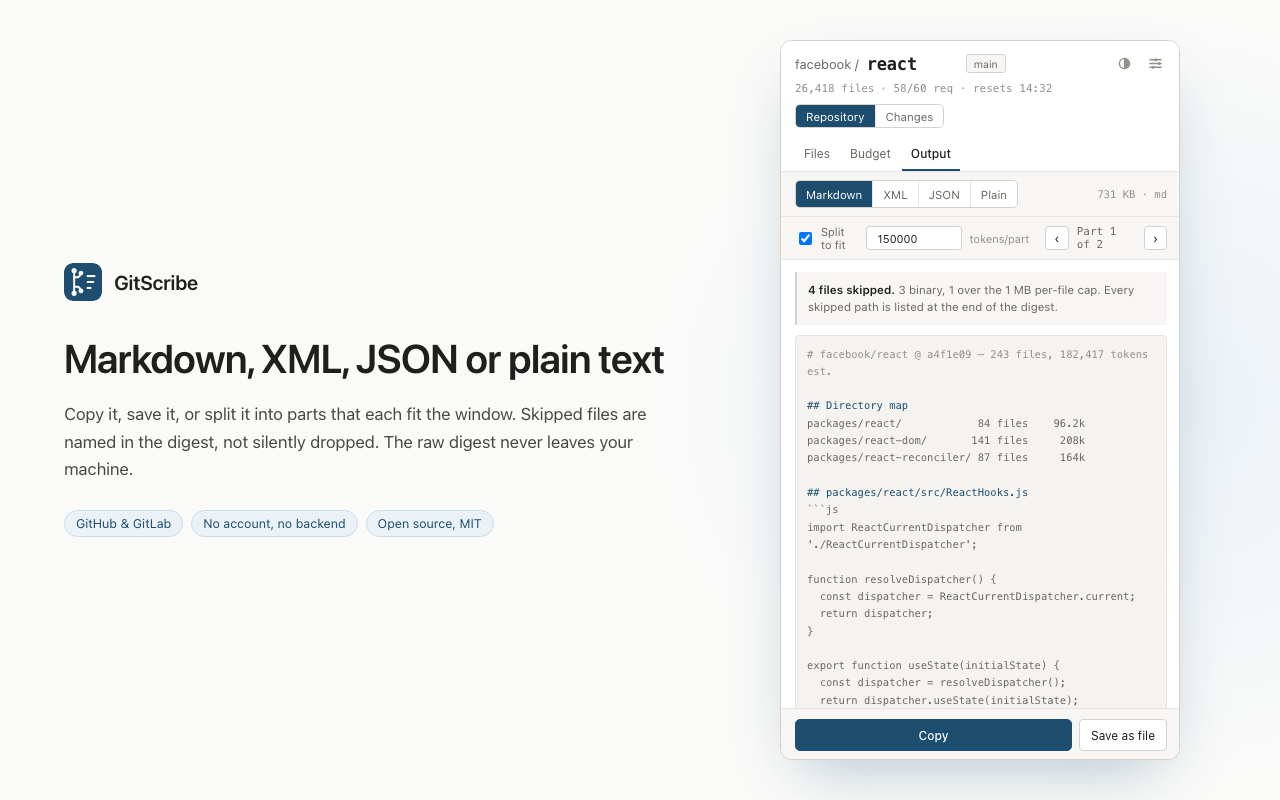
Format your output for optimal model parsing. Choose from structured Markdown code blocks, XML tags (ideal for Claude and Anthropic models), JSON payloads, or plain text. If your selected codebase exceeds a specific model's context threshold, GitScribe can automatically partition the digest into sequential, context-sized parts (e.g., Part 1 of 3) with consistent file indices.
5. Hallucination-Checked Architecture READMEs
When synthesizing a codebase overview, language models often invent plausible-sounding file names or misremember module paths. GitScribe cross-references every path cited in the generated README against the actual repository tree. Any cited file that does not exist in the source code is sequestered under an Unverified References warning header rather than left to deceive your team.
6. Real-Time Rate Limit Meter
Anonymous GitHub API calls are capped at 60 requests per hour — which can deplete quickly on shared office Wi-Fi. GitScribe provides a live status counter showing remaining API quota and reset times. Add a personal GitHub or GitLab access token in settings to expand your quota to 5,000 requests per hour.
Honest Engineering Guarantees
GitScribe is designed for working software engineers who value predictability:
- Conservative Token Estimates: Because proprietary tokenizers (Claude, Gemini, Grok) are not publicly distributed in client-side JS, GitScribe applies a calibrated estimate biased to over-count by 5–8%, preventing accidental mid-prompt rejections. With an API key, it can query the vendor's tokenizer endpoint for bit-exact numbers. Local Ollama windows are read directly from your running daemon.
- GitHub 300-File Cap Transparency: The GitHub comparison API truncates comparisons exceeding 300 files. Rather than failing quietly, GitScribe flags the restriction and explicitly names files that could not be retrieved.
- Zero Middleman Servers: All network requests travel directly from your browser to
api.github.com,gitlab.com(or your self-hosted GitLab instance), Ollama on127.0.0.1, or your designated AI provider. There are no tracking scripts, user accounts, or intermediary proxy servers.
How to use GitScribe
- Navigate to GitHub or GitLab — browse to any public or private repository or pull request.
- Open the GitScribe side panel — review the file tree with real-time token annotations.
- Tune your selection — filter directories, check exclusion rules, and monitor the context gauge against your chosen LLM.
- Copy Digest or Generate README — copy the formatted Markdown/XML bundle to paste into your LLM chat, or run AI synthesis to produce an architectural README.
Who it's for
Engineers doing code reviews, developers prompting AI coding agents, technical leads onboarding onto unfamiliar codebases, and security researchers auditing pull requests. Pair GitScribe with code analysis in RepoSpector, defect tracing in Tracely, bug reporting in Gotcha, and prompt evaluation in litmus.
FAQ
Does GitScribe send my private code to third-party servers? No. In raw digest mode, no source code leaves your local browser. In AI README generation mode, code is sent directly to your chosen provider (or kept local with Ollama). There is no GitScribe backend.
Do I need an API key to use GitScribe? No. The raw repository digest feature is completely free and requires no API keys or accounts.
Does GitScribe support self-hosted GitLab? Yes. You can configure custom GitLab domains and access tokens in the extension options.
Can I digest pull requests or commit ranges? Yes. GitScribe can process individual PR diffs or arbitrary branch comparisons like v1.0...main.
Is GitScribe open source? Yes. GitScribe is MIT-licensed and its source code is openly hosted on GitHub.