
What Refract SEO does
Modern search optimization requires diagnosing two fronts at once: legacy search engine crawlers like Googlebot and Bingbot, and generative AI answer engines like ChatGPT Search, Perplexity, and Claude. Refract SEO runs deep technical SEO and AI-readiness audits on whatever page you are currently viewing and tells you exactly what to fix first, with clear one-line remediations.
Unlike slow cloud auditing tools that require queued jobs or proxy setups, Refract SEO operates directly inside your Chromium browser as a lightweight side panel and full-screen workspace. It reads both the raw HTTP response and the hydrated client DOM, uncovering hidden discrepancies introduced by modern single-page applications and client-side JavaScript frameworks.
Key Features
1. Complete Indexability Chain & 80+ On-Page Checks
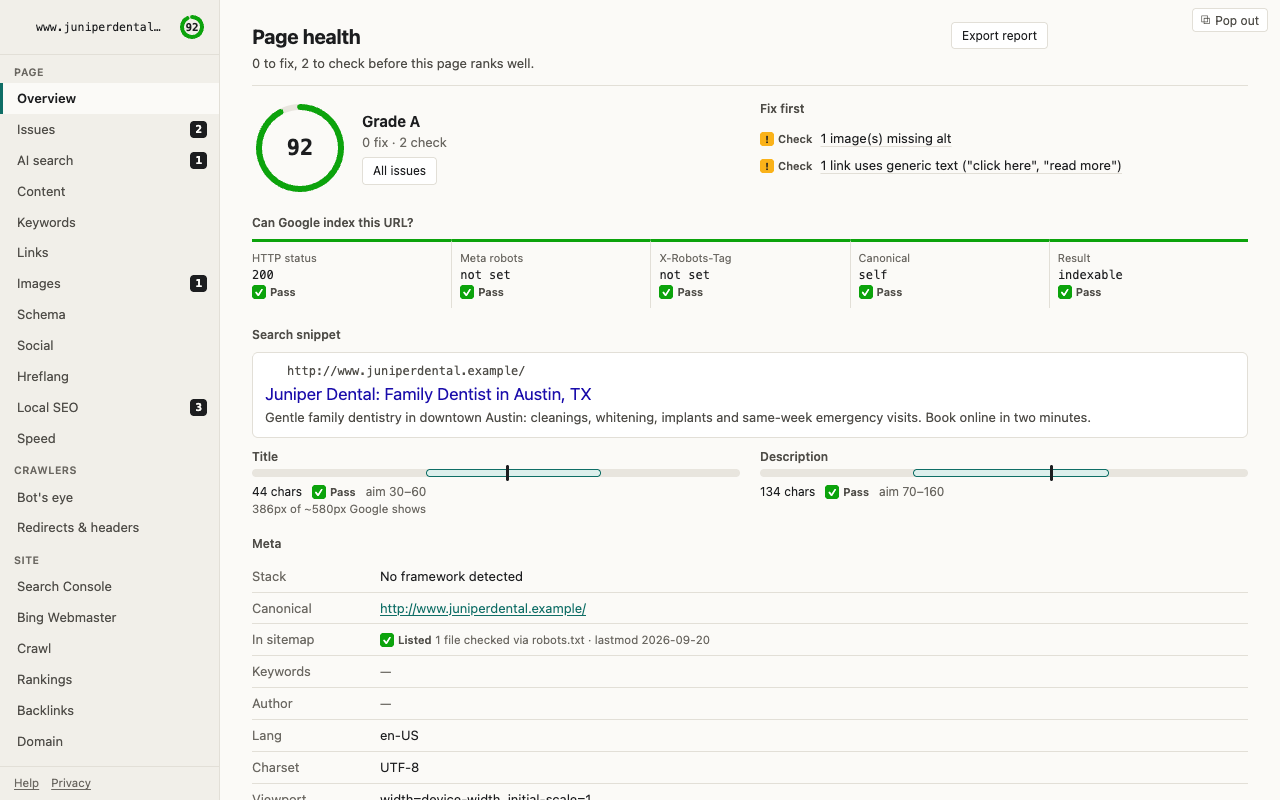
Can search engines actually index this URL? Refract SEO resolves the entire indexability chain in a single unified view: HTTP response status code, meta robots directives, X-Robots-Tag HTTP headers, canonical URL validity, and XML sitemap membership. It then executes around 80 automated on-page diagnostic checks, including:
- Title tag validation — checks character counts and exact pixel width rendering to prevent SERP truncation.
- Meta descriptions & headings — flags missing, duplicate, or malformed
h1–h6hierarchies. - Structured data validator — parses JSON-LD and Microdata schemas, flagging missing required and recommended Schema.org properties.
- Technical hygiene — inspects Open Graph social tags, hreflang bidirectional return tags, mixed content warnings, and canonical target health.
2. JavaScript Rendering vs Server HTML Diff
Single-page applications (React, Next.js, Vue, Angular) frequently inject or mutate critical metadata only after JavaScript executes. Search crawlers that fail to render client-side scripts see an entirely different page than real visitors. Refract SEO performs a live side-by-side comparison between your initial server response and the post-hydration DOM, immediately flagging titles, descriptions, canonical tags, and structured data blocks that only exist after client rendering.
3. AI Search & Answer Engine Readiness
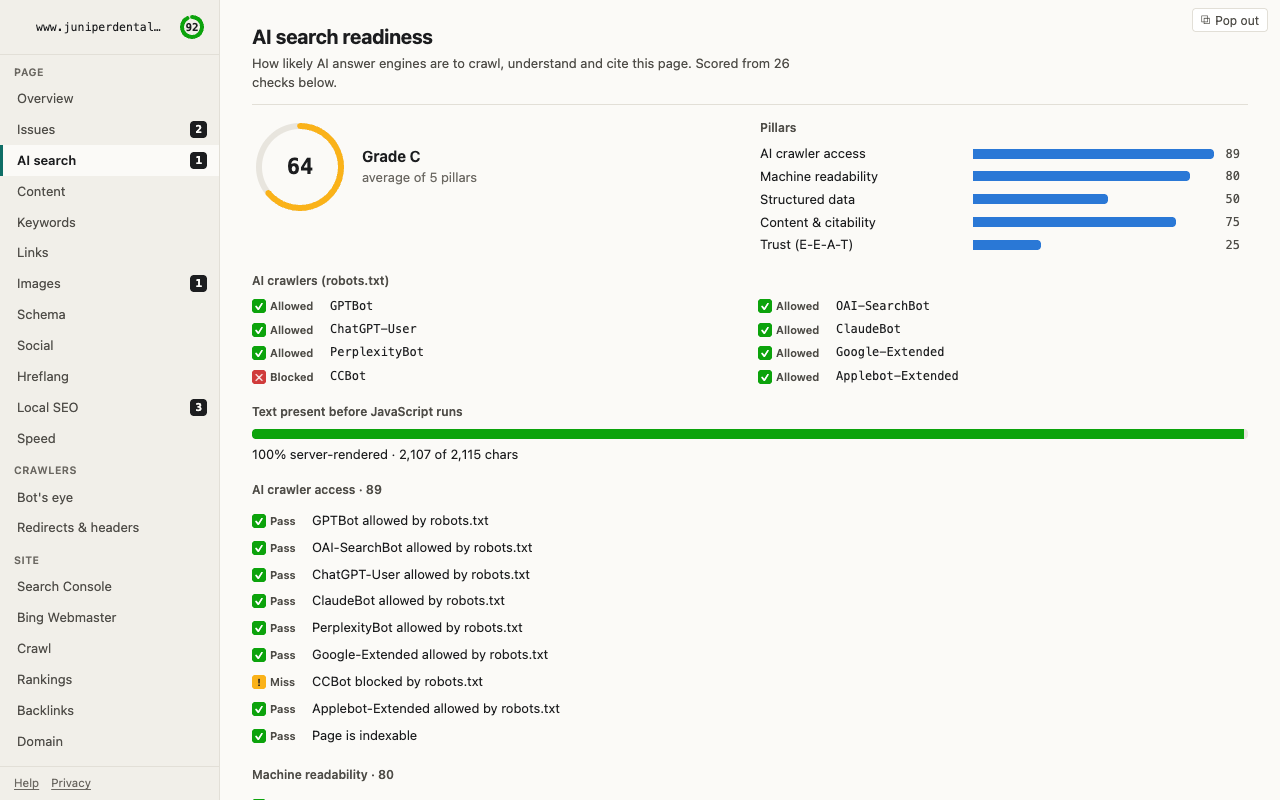
Generative AI engines rely on clear text density, structured data, and uninhibited crawler access. Refract SEO audits your site's readiness for AI discovery:
- Robots.txt AI crawler policies — verifies whether
GPTBot,ClaudeBot,PerplexityBot,Google-Extended, or other AI user agents are permitted or blocked. - Server HTML content density — calculates raw text volume available before JavaScript execution.
- llms.txt discovery — verifies the presence, syntax, and accuracy of your site's
/llms.txtfile for LLM summarizers.
4. Bot's Eye View & Redirect Chain Tracing
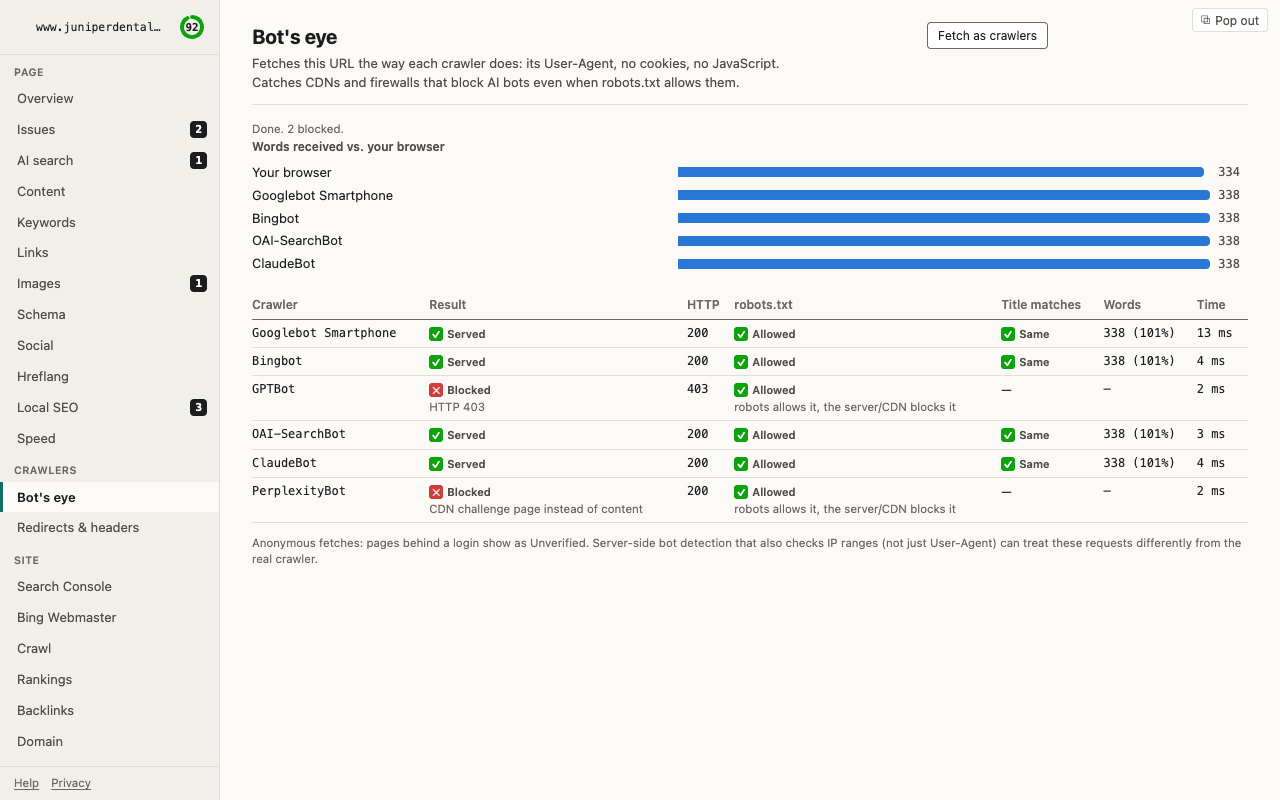
Servers, CDNs (such as Cloudflare or Akamai), and firewalls often behave differently toward automated bots than normal browsers. The built-in Bot's Eye tool fetches any URL spoofing user agents like Googlebot, Bingbot, or GPTBot. It catches 403 Forbidden errors, edge challenge screens, or CDN blocks that occur even when your robots.txt allows the crawl. Additionally, it traces multi-hop redirect chains step-by-step, displaying every intermediate HTTP status code and response header.
5. Whole-Site Crawling & Competitor Comparison
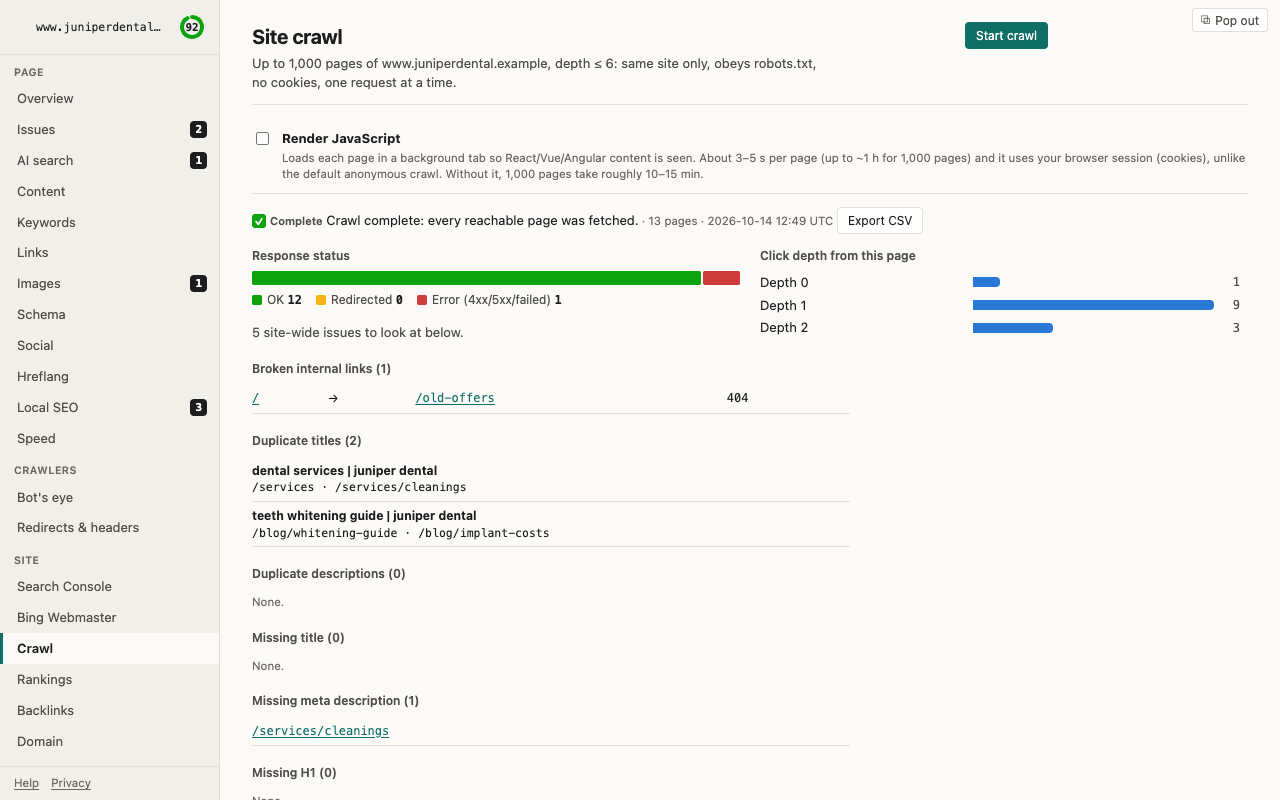
Need to audit an entire domain or section? Refract SEO includes an in-browser site crawler capable of crawling up to 1,000 pages, with optional JavaScript rendering. It flags broken internal links (404s), duplicate titles and meta descriptions, orphan pages with zero inbound links, incorrect canonicals, and click-depth issues. You can also benchmark your page against up to two competitor URLs side-by-side to identify content gaps and structural differences.
6. Connected Data & 100% Local Privacy
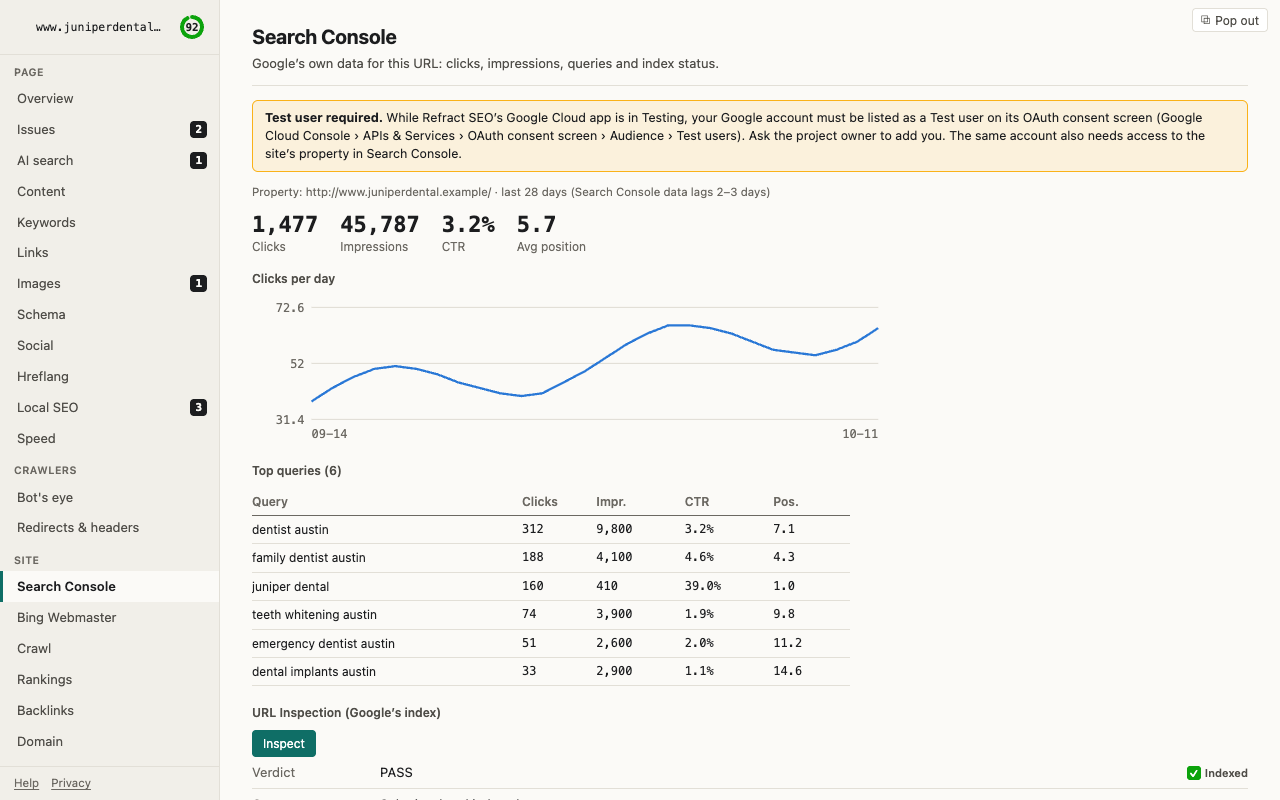
Optionally connect your Google Search Console account to view live page impressions, clicks, click-through rates, average position, and top ranking queries right next to your on-page audit. You can also connect Bing Webmaster Tools, or bring your own API keys for DataForSEO, Semrush, or Ahrefs. Every connector is completely opt-in and communicates directly with the respective API. No analytics, tracking tokens, or user data ever leave your machine.
How to use Refract SEO
- Open on any page — click the Refract SEO extension icon or launch it from the Chrome side panel to immediately trigger an on-page audit.
- Review indexability & fixes — scan the indexability banner to verify if the URL can be indexed, then review ranked issues with instant one-line remedies.
- Test crawler responses — switch to Bot's Eye to see how Googlebot and GPTBot receive the page and confirm your CDN isn't inadvertently blocking them.
- Run a full site crawl — enter your root domain or sitemap to crawl up to 1,000 pages and detect sitewide broken links and duplicate metadata.
- Export reports — generate a clean, self-contained standalone HTML audit report to share with clients, engineering teams, or stakeholders.
Who it's for
Technical SEO consultants, web developers, content strategists, and QA engineers who need instant, trustworthy technical audit data without switching between five different SaaS subscriptions. Refract SEO pairs naturally with real-session performance diagnostics from PerfLens, live API traffic analysis from XHRScribe, and DOM state inspection via StyleSpy.
FAQ
Does Refract SEO send my data to third-party servers? No. Refract SEO is built with a local-first architecture. All parsing, crawling, and analysis take place entirely in your browser. No accounts are required, and zero telemetry is collected.
How does it differ from browser-based Lighthouse audits? Lighthouse focuses primarily on lab performance and general best practices with a basic SEO pass. Refract SEO provides exhaustive technical SEO diagnostics: complete indexability chains, JS-vs-HTML diffs, AI bot blocking, sitemap cross-checks, redirect tracing, and full 1,000-page internal crawling.
Can it crawl JavaScript-heavy single-page applications? Yes. When running site crawls or on-page audits, you can enable JavaScript rendering so that dynamically generated links and client-side meta tags are fully evaluated.
What permissions does the Google Search Console connector require? Connecting Search Console is entirely optional. When enabled, it requests read-only OAuth access to display query metrics for the current URL. Credentials and API tokens remain stored exclusively on your local device.
Is Refract SEO free? Yes. It is completely free on the Chrome Web Store.